A Basic Nomad Lab
I’ve recently started using Nomad for container orchestration. While it’s definitely taken me more work and bashing my head against the wall to get stuff working, I’ve gotten a basic, no-storage web app working. There’s definitely some things that Nomad does differently than Kubernetes, and a lot of documentation that I’m not sure is written.
So let me do my best to walk you through what I’ve done, and what I haven’t been able to do. If you do get something to work that I didn’t, send me an email! I’ll cheer at your success, and maybe link to your work from this post.
If you don’t already know how the web works, please follow that link first. This post will be too long with just Nomad stuff to focus on.
Step 1: Plan Where You’re Going
This is not a production deployment. It is a lab deployment.
Adjust for your needs.
For this post, the lab will be at lab.example.com, and apps will be at app.example.com. Some web apps cannot be
told to generate URLs at paths other than /, so using DNS-based app resolution enables us to run more apps.
The lab will be in 10.0.10.0/24, with client machines in 10.0.0.0/24. How you choose to set up IP addressing is up
to you, but you will need some free IP addresses here and there.
As for software bits & bobs, a diagram is worth a thousand words:
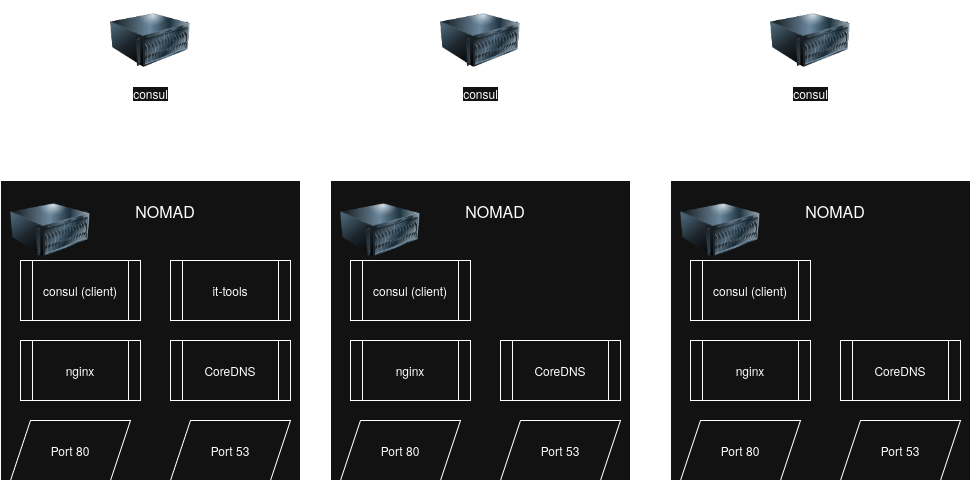
Bits & Pieces this post will set up
I’ll still have to spend 100 words (likely more) filling in some gaps.
Infrastructure
I have a proxmox cluster of 3-8 physical nodes to work with. If you’ve seen my past posts, you know the iron I have. 3+ bare metal nodes is useful for HA, but optional.
I’ll be using 6 VMs for this post (but doing it this way is kinda ugly, you’ll see). 3 for the Consul cluster, 3 for the Nomad cluster. The Consul cluster can be pretty small for this scale (1 core/1 GiB is probably plenty). For Nomad, 4 cores / 8 GiB RAM has quite a lot of space to get started with, but adapt to your needs.
I will not be discussing storage in this post. Stay tuned, it’s coming, I need to be able to run databases as well.
I will not be discussing networking in this post. I’ll get to it when it’s of benefit to me, which is not right now. Basic docker bridges are good enough.
Resolving DNS queries
The first step to loading a page is figuring out where it even is. I can tell you how to get CoreDNS up and running, but I can’t tell you how to integrate it into your network. In my case, my router supports forwarding DNS queries for a specific domain to a single IP address. You may recall from my last post that I use keepalived for this purpose. I’ve had to make some changes from my last post, which I’ll explain in a bit. But, overall, my last post describes most of what needs to happen to get DNS working, so I’ll try to keep that section brief.
Routing HTTP traffic
I spent forever trying to figure out what Nomad used for ingress, and then stumbled upon a Consul Template tutorial for using nginx as a reverse proxy. The tutorial only covered setting up 1 service, but with help from a friend, doing many services isn’t that hard.
Because I have to use Consul for service registration & nginx reverse proxying to work, that means my DNS setup has to work with Consul as well. But, once DNS is sorted, a templated nginx config takes care of all the ingress needs.
The Sample Webapp: it-tools
Many thanks to the it-tools project. It’s a great project with a lot of handy tools in it. And because it doesn’t need storage of any kind, it makes a great practical demo of a minimal cluster.
Walk-Through: Starting from a Proxmox cluster
I’m going to lean heavily on existing documentation where it exists, for which I make no apology. There’s already a lot written, and it goes into more depth than I can here.
I also assume you already have a Proxmox/XCPng/Harvester/… cluster of at least 3 physical nodes. If not, you’ll have to adapt what I show here.
Consul VMs
Make yourself three VM’s or LXC’s in Proxmox. 1core / 1GiB of RAM is plenty for a small cluster, IMO. Use your favorite distro & process for this, I don’t pay your bills.
You may want to consider Static IPs for these instances if your DNS setup isn’t rock-solid.
Deploying Consul
You’re going to have to glue some docs together on this one Start with the VM deployment root page, then follow the links.
Aside from making sure nodes can auto-join on reboot, my customizations aren’t that big of a deal.
Nomad VMs
Three more VM’s/LXC’s. This time, I prefer 4core / 8 GiB, but if you know you have different needs, adjust the spec. Again, I don’t dictate the process here.
You may prefer VMs for this one; there will be kernel & hardware shenanigans in play. You may also prefer an extra three 1 core / 1 GiB VMs as Nomad Clients for DNS.
Static IPs are once again on the menu if your DNS setup has problems.
My customizations are not relevant yet.
Deploying Nomad
Enabling ACLs
More docs gluing. As per my last post:
- SAVE ALL TOKENS GENERATED DURING THIS PROCESS!
- Bootstrap Consul’s ACL system via the docs.
- Bootstrap Nomad’s ACL system via the process in its docs
- Use the command
nomad setup consulto set up Workload Identity, which will allow Nomad to authenticate workloads against Policies & Roles in Consul.
Do some testing at this point with some test workloads. Make sure you can create policies that permit & deny stuff in Consul. Identify your problems now, fix them now, so that you simplify your life later.
it-tools: Setting the stage for future testing
This one’s pretty straightforward. Here’s the job HCL, deploy it via the UI or CLI:
job "it-tools" {
  type = "service"

  update {
    max_parallel = 1
    min_healthy_time = "10s"
    healthy_deadline = "3m"
    auto_revert = true
    canary = 0
  }

  group "ittools" {
    network {
      mode = "bridge"
      port "http" {
        to = 80
      }
    }

    count = 1

    restart {
      attempts = 10
      interval = "5m"
      delay = "25s"
      mode = "delay"
    }

    service {
      provider = "consul"
      tags = ["expose-lab"]
      name = "ittools"
      port = "http"

      check {
        name     = "ittools_http"
        type     = "http"
        path     = "/"
        interval = "10s"
        timeout  = "2s"
      }
    }

    task "web" {
      driver = "docker"

      config {
        image = "corentinth/it-tools:latest"
        ports = ["http"]
      }

      resources {
        cpu    = 500 # 500 MHz
        memory = 1024 # MB
      }

    }

  }
}
I’ve explained this before, so let’s be quick about this:
- I still don’t have a need for multiple replicas or canary deployments for this app, so the update policy is simple.
- Bridge mode networking for this app. It listens on port 80, but we don’t care what port it’s on externally.
- The restart policy is mostly made up. Delete the block if you like, or rewrite it how you like.
- Service registration is now in Consul. I use the tag
expose-labto flag services for nginx. This is adjustable, you’ll see later. - There is a health check on the
ittoolsservice. - Pretty basic Docker app with some mildly low limits They probably could be tighter.
Get the job running, then check that you can load the home page via IP Address and Port Number. Nomad’s UI will help with that. Then, make sure it-tools is registered in Consul, and then check that DNS queries to Consul work anonymously. CoreDNS will be forwarding DNS queries to Consul, so best to make sure they work now. If not, here’s the ACL policy you’ll need to grant to the anonymous token:
service_prefix "" {
  policy = "read"
}

node_prefix "" {
  policy = "read"
}
Yeah, that’s a lot of info to leak to everyone on the homelab network. I’ll explain more in the DNS section.
Note that I don’t grant query-read here. That’s only used for prepared DNS queries, which I don’t use. So I don’t grant it.
DNS
I went over this in some detail in a previous post, but I did have to make some changes. Credit to perrymanuk for getting me this far.
Host Changes Are Required
There’s two host tweaks needed to make this stuff run like a well-oiled machine:
- CoreDNS will likely conflict with systemd-resolved.
systemctl disable --now systemd-resolved.service - The linux kernel doesn’t let you bind to non-local IP addresses by default.
sysctl -w net.ipv4.ip_nonlocal_bind=1, with file edits required to make it permanent.
The HCL
Here’s the job’s HCL:
job "coredns" {
  namespace = "dns"
  datacenters = ["hl1"]
  type = "service"

  group "dns" {
    count = 3

    constraint {
      operator = "distinct_hosts"
      value    = "true"
    }

    network {
      mode = "host"
      port "dns" {
        static = "53"
      }
      port "metrics" {
        static = "9153"
      }
    }

    update {
      max_parallel     = 1
      min_healthy_time = "60s"
      canary           = 0
    }

    task "keepalived-dns" {
      driver = "podman"

      lifecycle {
        hook = "prestart"
        sidecar = true
      }

      config {
        image = "docker.io/osixia/keepalived:2.0.20"
        network_mode = "host"
        force_pull = false
        volumes = [
          "local/:/container/environment/01-custom"
        ]
        cap_add = ["NET_ADMIN", "NET_BROADCAST", "NET_RAW"]
      }

      template {
        destination = "local/env.yaml"
        change_mode = "restart"
        splay       = "1m"
        data        = <<EOH
KEEPALIVED_VIRTUAL_IPS:
  - 10.0.10.2/24
KEEPALIVED_UNICAST_PEERS:
{{- range service "coredns" }}
  - {{ .Address }}
{{- end }}
KEEPALIVED_INTERFACE: {{ sockaddr "GetPrivateInterfaces | include \"network\" \"10.0.10.0/24\" | attr \"name\"" }}
EOH
      }

      resources {
        cpu    = 100
        memory = 32
      }
    }

    task "coredns" {
      driver = "podman"

      config {
        image = "docker.io/coredns/coredns:1.13.2"
        network_mode = "host"
        force_pull = false
        ports = ["dns", "metrics"]
        args = ["-conf", "/local/coredns/corefile"]
      }

      identity {
        env = true
        change_mode = "signal"
        change_signal = "SIGHUP"
      }

      service {
        port = "dns"
        name = "coredns"
        tags = ["coredns"]
        check {
          type     = "tcp"
          interval = "10s"
          timeout  = "2s"
        }
      }

      service {
        port = "metrics"
        name = "coredns"
        tags = ["metrics", "coredns"]
      }

      template {
        data = <<EOH
. {
    bind {{ env "NOMAD_IP_dns" }} 10.0.10.2
    health
    log
    errors
}

lab.example.com. {
    bind {{ env "NOMAD_IP_dns" }} 10.0.10.2
    debug
    rewrite stop { name suffix lab.example.com service.consul answer auto }
    forward service.consul 127.0.0.1:8600
    cache 30
}
EOH
        destination = "local/coredns/corefile"
        env         = false
        change_mode = "signal"
        change_signal = "SIGHUP"
        left_delimiter  = "{{"
        right_delimiter = "}}"
      }

      resources {
        cpu    = 100
        memory = 128
      }
    }
  }
}
For those just tuning in from search engines, let’s go through the details on this one:
- Custom namespace for DNS for extra permissions that I don’t want most workloads to have. Policy up next.
- Datacenter is just my customization. Completely optional, but match your setup.
typeset toserviceis just what I did for now.systemis a reasonable option too. Check the docs- Because I’m using
type = service, I have to specifycountanddistinct_hosts.distinct_hostsis crucial; can’t have two instances both listening to port 53 on the same machine. - Port mapping is static for predictability. Port 53 in particular needs to be correct in my setup.
- Very slow updates in order to avoid disrupting quorum too hard. No canary because I don’t want to have 6+ VMs to run DNS on.
- keepalived setup:
- Podman driver because I didn’t feel like reconfiguring Docker to allow the extra kernel capabilities that keepalived needs.
- We want keepalived to muck with quorum and allocating the IP address before CoreDNS starts.
- Host network to make sure network magic works correctly
local/folder that is Nomad’s scratch space to a different directory. This is container-specific customization.- The extra capabilities for keepalived (
cap_add) are not remotely optional. keepalived does some network magic to make Virtual IPs (“VIPs”) work correctly, and the capabilities added are needed for that magic. - The templated config file has some magic going into it.
- First, this is container config, not raw keepalived config. The container itself does some magic.
- For DNS, we only need the one VIP. No point adding a second; it’d just break at the same time the first one breaks.
- I didn’t mess with
change_mode, but given the container magic? Makes sense. - The
range servicebit is Consul Template, and it lists out all the instances registered to thecorednsservice. - The
sockaddr | includeline is some bit of NIC magic I copied from perrymanuk ’s work. The similarities are probably easy to spot.
- We don’t need much in terms of resources most of the time.
- coredns setup:
- Podman driver for consistency/simplicity
- Container config is a bit simpler here.
- Host networking for simplicity/consistency, sure, but we might not need it? Unclear.
- Instead of mounting the
/localfolder elsewhere, we just tell CoreDNS where it can find the config file.
- The identity block probably only works for Nomad, and probably doesn’t help much in the current setup, but it’s there for now.
- Service registration for the DNS port is crucial for the keepalived config to work.
- I’m not doing anything with the metrics port yet, but it’s there.
- The CoreDNS config uses binding to listen to both the VIP and real IPs (sourced from Nomad)
- Yes, I’ve got a lot of extra logging & debugging tools enabled. It’s always DNS, yeah?
- Rewrite our desired DNS names into stuff Consul will recognize. If we had Consul namespacing, I’d use it here, but it’s exclusive to Enterprise Edition, so I can’t.
- Forward things rewritten to Consul to Consul’s DNS interface. Because CoreDNS treats this as a bog standard DNS query, there’s some authn/authz issues, I’ll talk more below.
- Cache for 30s.
- Config reloading via signal is available & helps prevent downtime.
- Not many resources required here.
The major change here is serving DNS from Consul services instead of Nomad services. As stated above, this is because of templating in the nginx side (I’ll get there). The problem this switch causes is that CoreDNS has a Nomad plugin by default, but not a Consul plugin. So all queries to Consul are via the DNS interface, and seemingly anonymous. In my setup currently, this means anyone on the homelab network can get a list of Consul servers, and what services are running. Not great, but a firewall takes care of that until someone gets in with a supply chain attack or an app hack. I have not been able to get DNS queries to work on machine keys yet. This is not to say they can’t, just that I haven’t gotten it to work yet. The issue with the DNS interface is definitely an ACL issue, though. Even if I do get that fixed, though, a Remote Code Execution exploit will likely be enough to get a full list of services to pivot to (since the DNS process itself doesn’t appear to allow a Consul token to be specified).
Options for tidying:
- Authentication tokens to a DNS query
- Get Consul to recognize machine tokens
- Add policy to machine tokens, if they’re missing permissions
- A CoreDNS plugin that supports Consul
- Make Nomad templating to work in nginx (so I can go back to Nomad service registration)
Lots of unanswered questions in those paragraphs, hopefully it all makes sense.
I have extra policy set in Nomad for jobs in the DNS space, but with the Consul refactor, I think they’re being used by nginx, not CoreDNS. Let me know if I got that wrong, and I’ll update this post.
Get the job running, make sure it’s stable, then check that the VIP works and that you can check the IP address of it-tools. If you get a response from CoreDNS with an IP Address, awesome. If not, now’s the time to go googling. Double-check your work with Consul, especially that DNS queries work anonymously, and that you have the anonymous token running with the right policy. Then check IP Address & Port to get Nomad tasks querying Nomad’s DNS interface. Then you can focus on the CoreDNS config to get the client-side DNS queries behaving sanely.
Once you get CoreDNS working properly, check in with yourself to see if you need a break. Getting this far is a victory onto itself.
nginx
Just a little further. A lot of info came from this tutorial, but I also had to do some of my own problem solving. Here’s the job for nginx:
job "nginx" {
  datacenters = ["hl1"]
  namespace = "dns"

  group "nginx" {
    count = 3

    constraint {
      operator  = "distinct_hosts"
      value     = "true"
    }

    network {
      port "http" {
        static = 80
      }
    }

    service {
      name = "nginx"
      port = "http"
    }

    task "nginx" {
      driver = "docker"

      config {
        image = "nginx"

        ports = ["http"]

        volumes = [
          "local:/etc/nginx/conf.d",
        ]
      }

      template {
        data = <<EOH
{{- range services }}
{{- if .Tags | contains "expose-lab" }}

upstream backend_{{- .Name }} {
{{- range service .Name }}
  server {{ .Address }}:{{ .Port }};
{{- end }}
}

server {
   listen 80;
   listen [::]:80;

   server_name {{ .Name }}.l.xenrelay.com;

   location / {
      proxy_pass http://backend_{{- .Name }};
   }
}
{{- end }}
{{- end }}
EOH

        destination   = "local/default.conf"
        change_mode   = "signal"
        change_signal = "SIGHUP"
      }
    }
  }
}
Explanation:
- Datacenter is just my customization
- Namespace “dns” to reuse some expnded permissions I had for DNS based on Nomad Service Discovery.
typeis apparentlyserviceby default, but tbh, this is a great candidate for asystemjob.- Distinct hosts & count 3 to make sure I have exactly one per host.
- No special update process needed.
- Static port mapping, but we can let Nomad do bridged networking. Important thing is Port 80 in & out of the task.
- HTTPS not added yet. Soon (tm).
- Service block to make sure Nomad exposes nginx to the outside world. Also registers in Consul, but that’s not relevant to any use case I have.
- Docker driver because it’ll work here.
- The nginx container has some expectations about config file location & naming, so mounting
local/makes it easier to check the boxes - Use the HTTP port. HTTPS to be added later.
- The nginx container has some expectations about config file location & naming, so mounting
- Config file needs some explaining.
- The important thing is to generate a
upstreamblock and aserverblock unique to each service. - But, I have more services in Consul than I want exposed. So, I condition on the
expose-labtag being present. Whateverifcondition you can template for, you can use to filter Consul services. Check the docs, start following links, have fun. Personally, I’ll stick toexpose-lab, and maybe anexpose-prodtag if I feel like maintaining a more production-grade environment. - The
upstreamblock lists the tasks we’re proxying to, and uses a Consul query to get service details. - The
serverblock establishes vhost DNS name, ports, and the link to the backend.
- The important thing is to generate a
- The file name is important. nginx looks for
default.conffirst. - Signal-based reloading works here, so I use it. Check the logs to make sure your changes stick.
Templating
You’ll note in the nginx job HCL the heavy reliance on Consul-specific service discovery templating. There are functions for Nomad service registration that should do similar thing, but I was not able to get them to work in testing. It’s possibly I got many things wrong, but without any logs or troubleshooting insight, I was not able to identify why the Nomad functions didn’t work. So, Consul templating it is.
ACL Policy
You’ll likely need some policy in order for all this to work. If you got Workload Identity working, you’ll want a role
named nomad-dns-tasks in Consul. I have the following policy assigned to that role:
node_prefix "" {
  policy = "read"
}

key "test" {
  policy = "read"
}

service_prefix "" {
  policy = "read"
}

key_prefix "apps/default/" {
  policy = "read"
}
Key prefix is a bug, but it’s what I have assigned. Should be apps/dns/ instead. Chalk up an “L” for laziness.
I’ll share my Nomad ACL setup, but it’s all there for Nomad service discovery so it should be optional.
To match my Nomad ACL setup, create a file named dns-read-jobs.hcl on a machine with the nomad CLI command installed:
namespace "default" {
  capabilities = ["read-job", "list-jobs", "read-job-scaling"]
}

namespace "lab" {
  capabilities = ["read-job", "list-jobs", "read-job-scaling"]
}

namespace "public" {
  capabilities = ["read-job", "list-jobs", "read-job-scaling"]
}

namespace "dns" {
  capabilities = ["list-jobs", "read-job", "read-job-scaling"]
  variables {
    # list access to variables in all paths, full access in nested/variables/*
    path "*" {
      capabilities = ["list"]
    }
    path "app/dns/*" {
      capabilities = ["write", "read", "destroy", "list"]
    }
  }
}
CLI command to apply the policy properly:
nomad acl policy apply -namespace dns dns-read-jobs ./dns-read-jobs.hcl
No, I can’t find a UI way to do the Nomad policy work. Sorry.
With the nginx job running and the policies set up, check the logs for any errors. Then exec into your nginx allocations
to make sure the config file looks sane. Lastly, use a web browser to try to load http://ittools.lab.example.com. You
should be greeted with the it-tools homepage.
If so, congratulations! Go celebrate with a lovely cup of ${BEVERAGE}!
Conclusion
While this setup does work, I’ve noted some things that could be improved:
- Consul DNS Queries being unauthenticated is a bit of a security issue.
- The extra host tweaks required to make DNS & keepalived work would be best kept to dedicated VMs.
- I need to flip nginx to a
systemjob. - Nomad Servers are on the same VMs as workloads. In a production scenario, you’d have 3 Nomad Servers, and then seperate Nomad Clients/Consul Clients for your workloads.
- Workloads are still accessible directly from the network, if you know where to look, rather than being hidden behind a Nomad-only virtual network.
- No HTTPS.
- Authenticating with the Consul & Nomad UIs is painful, as I don’t have an OIDC provider setup.
- Vault is not implemented.
- There’s no good source of persistent storage.
…and likely others. I’ll be fixing HTTPS and the lack of persistent storage shortly, but some of the others may take a while.
Remember, this blog post isn’t intended to be the definitive resource on how to do a Nomad homelab. It’s designed to glue several other resources together into a complete-but-minimal picture. With this and a relational DB outside of Nomad, there’s a lot of webapps you can run. Adapt this post to your needs, see if the docs describe anything you might like, and see what you can come up with to improve on what I’ve got here.
Hope this helps!